On this page
The resume photo question splits into two clean halves. In some countries it is expected; leaving it off makes you look unprepared. In other countries it is discouraged; including one can quietly hurt your application or even get your resume rejected by an HR policy.
Most candidates default to one approach (the one their friend used, or the one their resume template came with) and never check whether it matches the market they are applying in. That guess often costs them.
This guide covers when to add a photo to your resume and when to leave it off in 2026, where to place it if you do include one, and how to take a photo that helps rather than hurts.
Should You Add a Photo to Your Resume?
The short answer: it depends on where you are applying. The country and industry both matter.
Countries Where You Should Skip the Photo
In the United States, Canada, the United Kingdom, Australia, and Ireland, photos are generally discouraged on resumes. The reason is anti-discrimination law and policy. Hiring managers are trained to avoid forming impressions based on appearance, and many companies have HR rules that require recruiters to discard resumes with photos to keep the process fair.
If you submit a US resume with a photo, two things may happen: an applicant tracking system fails to parse the resume cleanly, or a recruiter sets it aside without reading it. Neither helps you.
Exception: roles in modeling, acting, broadcasting, hospitality (in some chains), and other appearance-relevant fields where the photo is a job requirement. Those postings will say so.
Countries Where Photos Are Expected
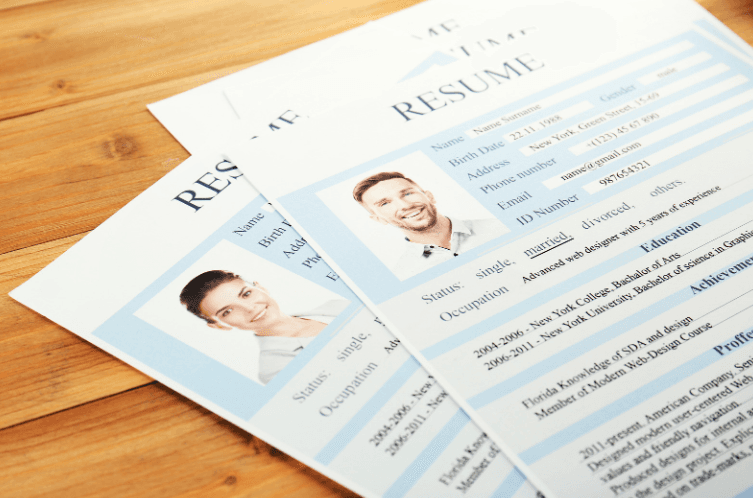
In Germany, France, Spain, Belgium, Austria, Switzerland, and much of continental Europe, a small professional photo on the resume is standard. Recruiters expect it. A resume without one can read as incomplete, especially in more formal industries.
In Japan, South Korea, China, and several other Asian markets, photos are also conventional and often required. Some markets even specify the dimensions and background color. Check the application instructions; if the company tells you what photo to use, follow it exactly.
Countries That Are Mixed
The Middle East, Latin America, and parts of Eastern Europe are mixed. Default to no photo unless the posting or recruiter signals otherwise.
If you are unsure, two safe moves: ask the recruiter directly, or look at the LinkedIn profiles of current employees in similar roles. The norm in their market will be visible there.
Where and How to Place the Photo
If you have decided to include a photo, treat it as a small accent, not a feature. The photo should support the resume, not compete with it.
- Position: top corner, either left or right. Many European templates place it next to the header block.
- Size: roughly 2x2 inches (5x5 cm) or smaller. Anything bigger eats space your work history needs.
- Shape: square or rectangular for traditional resumes, circular for modern designs. Both are acceptable.
- Resolution: high enough to look sharp at print size; not so large it bloats the file. A 600 to 800 pixel image at the long edge is plenty.
- Format: embedded in the resume document (Word or PDF), not pasted as a separate attachment.
Five Rules for a Professional Resume Photo
1. Background
Plain and neutral. A light gray, off-white, or soft pastel wall works. A photo backdrop or a clean section of fabric also works if you cannot find a clean wall. Skip busy backgrounds (kitchens, bookshelves, cars, beaches). The recruiter's eye should land on your face, not the room behind you.
2. Color and Outfit
Stick with classic and neutral colors: navy, charcoal, black, white, soft blue. A simple business or business-casual look works for most industries. Match the dress code of the company you are applying to: a suit and tie for finance and law, a clean button-down for tech and creative, a blazer over a plain top for general office roles.
Skip large logos, busy patterns, statement jewelry, and anything that pulls focus from your face. The point is for the recruiter to remember you, not the shirt.
3. Facial Expression
Aim for a relaxed, natural smile. Closed-mouth or slightly open is fine; a forced grin is not. Look directly at the camera lens. Keep your shoulders square and slightly relaxed.
Avoid extremes: do not look stern, do not laugh, do not strike a pose. The goal is approachable and confident, the same expression you would have if you walked into the interview and shook the hiring manager's hand.
4. Lighting
Natural light is your friend. Stand near a window during the day so the light falls evenly on your face. Avoid direct overhead light (it casts shadows under your eyes) and avoid backlight (it turns you into a silhouette).
If you are taking the photo indoors at night, use a ring light or a softbox. Two diffused light sources at 45 degrees work better than a single harsh lamp.
5. Framing
Head and shoulders. The crop should include the top of your head with a small margin and end somewhere around your collarbone or upper chest. Closer crops feel claustrophobic; wider crops shrink your face and lose the point.
Eyes should sit roughly one-third of the way down from the top of the frame. This is a standard portrait composition rule and it matches what hiring managers are used to seeing.
How to Get a Resume Photo
Four options, ordered from most to least polished.
- Professional photographer. A 30-minute headshot session with a local photographer typically costs $100 to $300 and produces images you can reuse for years across LinkedIn, your resume, and your professional profiles. Worth it if you are job-hunting at a senior level or a competitive market.
- DIY with a phone. Modern smartphones produce excellent photos in good light. Use the back camera (not the front), set the timer, and shoot near a window. Have a friend or family member take it if you can; self-shot photos tend to look stiff.
- AI headshot tools. Several services in 2026 will generate professional headshots from a few selfies. Quality has improved, but they can still look slightly synthetic and recruiters are increasingly able to spot them. Use as a backup, not a default.
- Career center or job agency. Many universities and job placement services offer free headshot sessions to students and members. If you have access, use it.
Resume Photo Don'ts
Even if you nail the technical fundamentals, certain photos sink applications. Avoid all of these:
- Selfies. The angle, the lighting, and the cropped arm all read "casual." Use a real headshot.
- Group photos with someone cropped out. Recruiters can tell, and it looks lazy.
- Vacation or party photos. Even a flattering one signals you do not own a single professional image.
- Outdated photos. Use a photo from the last two years. If you walk into the interview looking ten years older than your photo, you have started on the wrong foot.
- Heavy filters. Smoothed skin and saturated colors trip the radar. Aim for natural.
- Sunglasses or hats covering your face. Recruiters need to see your eyes.
- Pets, partners, kids in the frame. Crop them out or take a new photo.
- Photos with a busy logo or location behind you. Conference badges, restaurant signs, beach umbrellas. All distracting.
A Note on ATS and Resume Photos
Even when a photo is culturally appropriate, it can confuse some applicant tracking systems. Older parsers occasionally read the photo block as a corrupted text element and skip a chunk of your resume.
Two safer practices if you must include a photo:
- Submit your resume as a PDF rather than a Word document; PDF rendering is more consistent.
- Keep the photo in a clean column or at the top corner, not embedded inside body text.
- If the application portal lets you upload a separate photo, use that field instead of embedding the image in the resume itself.
The Final Take
The resume photo question is mostly a geography question. In the US, UK, and Canada, leave it off unless the role specifically calls for one. In much of Europe and parts of Asia, include a clean, professional headshot.
If you do include a photo, treat it like the rest of your resume: clean, professional, and quietly polished. The photo should make the recruiter glance, nod, and keep reading the experience section, which is where you actually win the interview.
Skip the format wrangling and template-shopping. Our AI resume builder handles layout, ATS keywords, and bullet rewrites for you — free to start. Browse resume examples by role to see what good looks like for your target job.
Keep reading
- ATS Resume Guide 2026: How Workday, Greenhouse, and AI Screeners Actually Read You
- CV vs Resume: Key Differences and When to Use Each (2026)
- How Long Should a Resume Be in 2026? Honest Answer
- How to Build a Resume Header That Gets You Hired in 2026
- Resume Headline Examples and How to Write One in 2026
- Resume Summary in 2026: The 4-Line Formula + 16 Examples by Role